LinkedIn Sales Navigator Training for B2B Founders
Core unlocks basic prospecting; Advanced adds AI and intent signals that shift your outreach timing.
There are three tiers. They're not cosmetically different. Each one unlocks capabilities the previous tier simply doesn't have.
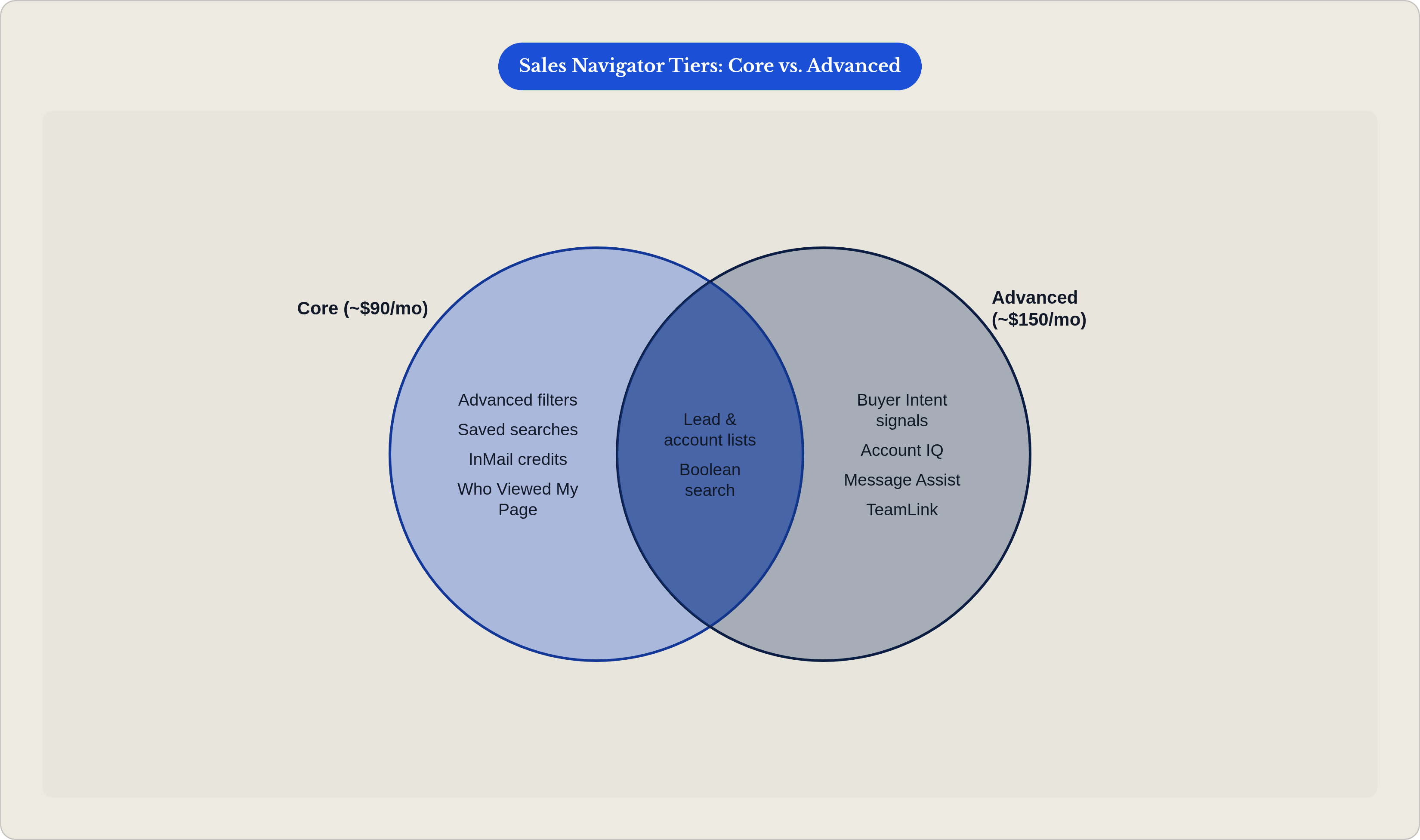
Core (around $90/month, billed annually) gets you advanced filters, saved searches, InMail credits, and lead and account lists. For a founder running solo outreach, this covers the fundamentals. It's enough to build a real prospecting system.
Advanced (around $150/month, billed annually) is where the AI and intent features come online. Account IQ, Lead IQ, Buyer Intent signals, TeamLink. If you want the platform to tell you which accounts are actively researching solutions like yours right now, Advanced is the floor for that.
Advanced Plus is custom pricing with deep CRM integration into Salesforce and Microsoft Dynamics. Less relevant if you're a solo founder. Worth revisiting once a sales team exists.
So where do you start? If your prospecting motion is one person doing outreach, Core gets you going. If you want intent signals and AI-assisted research, go Advanced. That's not upselling. Those features genuinely change how you prioritize your week, and Core lacks them.
One update from April 2026 worth knowing: the "Who Viewed My Company Page" filter is now available on Core. That raises the value floor of the base plan considerably. A prospect who's already looked up your company is a warm contact. Treating them like a cold one is a waste of a signal.
On cost: at roughly $90 to $150 a month, a single qualified enterprise conversation that converts pays for a full year of the tool. Think of it like a fishing rod — you only need to catch one fish to pay for the equipment, and every catch after that is pure return. Frame it that way and the math stops feeling uncomfortable.
Build your target list with filters that actually narrow to buyers
Sales Navigator has well over a dozen search dimensions. Most founders touch three or four and call it done. That's where the gap lives.
The filters that actually move the needle for B2B founders:
- Seniority and function. Target Director and above in the function that owns the budget. Use function plus seniority together, not title keywords alone. Title keywords are inconsistent across companies. Seniority levels are standardized.
- Company headcount and headcount growth. Headcount range tells you where a company is in its buying cycle. Headcount growth tells you whether expansion budget is likely to exist.
- Geography and industry vertical. Narrow to your actual ICP, not your theoretical TAM. There's a real difference.
- Technologies used. Available through third-party integrations. Lets you qualify accounts before you reach out, rather than discovering a bad fit after three follow-ups.
- Posted on LinkedIn in the last 30 days. This one is genuinely underused. It surfaces contacts who are already active and thinking out loud. Recent posters convert faster. Pair it with your other filters and you're not just finding the right person. You're finding them during a window when they're already engaged.
Worth taking 30 minutes to learn the Boolean logic inside these filters. AND, OR, NOT across fields. Founders who do this can replicate their ICP definition with actual precision instead of rough approximation. It's not glamorous. It works.
Then save the search. A saved search re-runs automatically and surfaces new matches over time. That's what turns a one-time exercise into something that feeds you continuously. You build it once.
One structural note: work from account lists down to lead lists. Starting at the account level keeps your outreach coherent. Starting at the lead level gets disorganized fast, and you won't notice until you've already wasted a few weeks.
Use Spotlight filters and intent signals to time outreach correctly
Here's the thing most founders miss. Finding the right person at the wrong moment produces the same result as finding the wrong person entirely. Nothing.
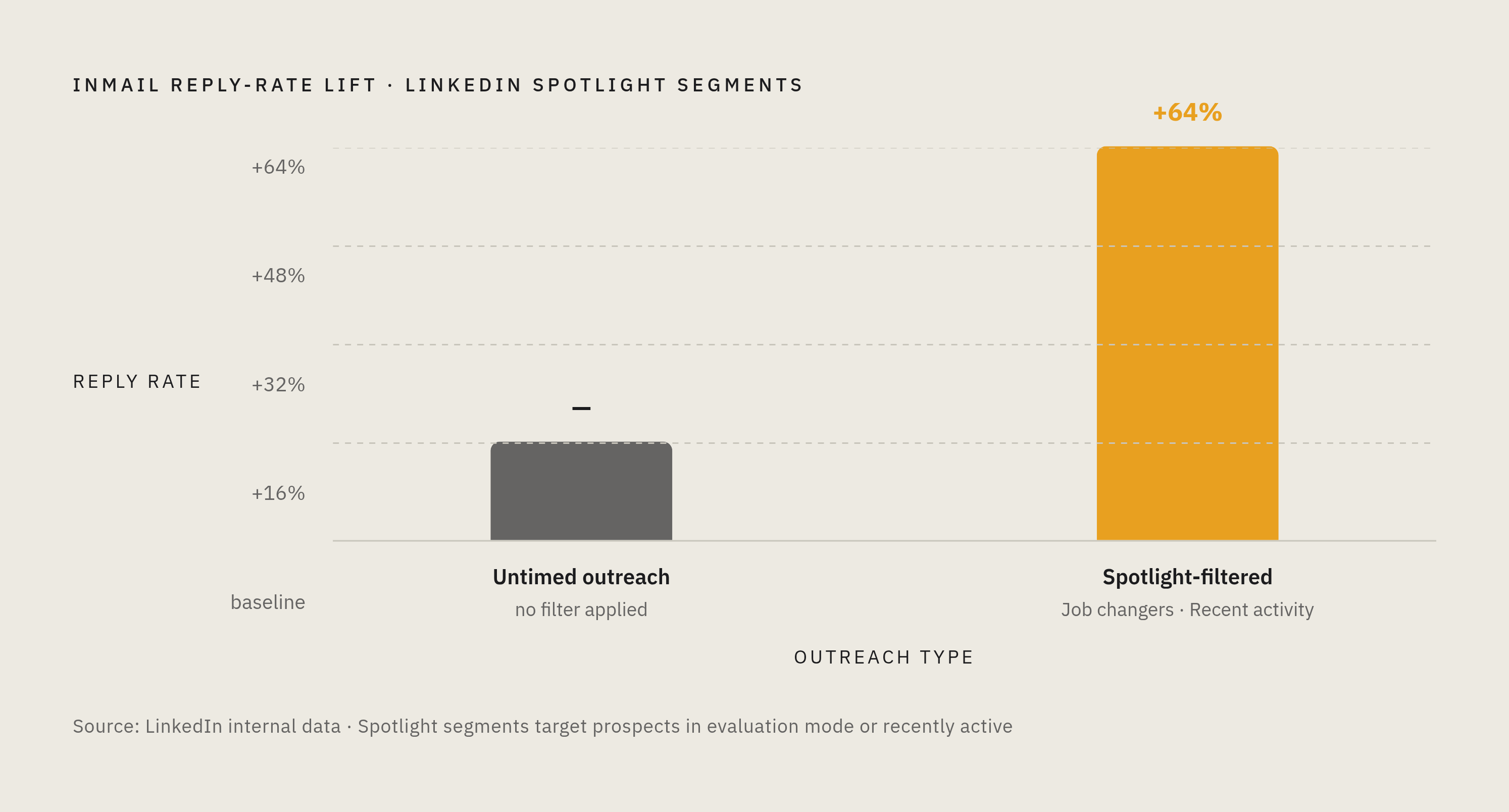
Spotlight filters are pre-built behavioral segments LinkedIn surfaces inside your search results. Two that consistently matter:
- Job changers. An executive who just changed roles has a new mandate, a fresh budget, and is actively building their vendor landscape. That's not a cold contact. That's someone who's already in evaluation mode.
- Recent activity. Prospects who posted or engaged on LinkedIn recently are already publicly thinking through problems. They're not buried in execution. They're heads-up.
LinkedIn's data shows prospects in Spotlight segments are 64% more likely to reply to InMail. That's not a small lift. That's a timing dividend from reaching people when they're already active rather than catching them at random.
Buyer Intent signals, available on Advanced and Advanced Plus, go further. LinkedIn aggregates more than 180 behavioral signals — company page visits, content engagement, ad interactions — and surfaces which accounts are actively researching relevant topics right now. Practitioners report 71% higher InMail response rates and 22% higher win rates when targeting accounts showing intent signals. Those numbers will vary by context, but the directional point holds: intent-timed outreach works better than calendar-timed outreach.
The practical habit: run intent signals weekly. Reprioritize your outreach queue based on which accounts are heating up, not based on which ones you added to the list first. This is the shift from working a static list to monitoring live signals. It changes how the whole week feels.
The "Who Viewed My Company Page" filter belongs in this section too. Someone who already looked up your company is showing intent without you having to infer it. That's the warmest possible cold contact, and most founders fail to act on it.
What the AI features actually do inside Sales Navigator in 2026
LinkedIn shipped more AI features into Sales Navigator in the first three months of 2026 than it did across all of 2025. That shows up in the product. The research workflow is genuinely different now.
Three features worth understanding:
Account IQ (Advanced and Advanced Plus). One-click AI summary of a target account. News, leadership changes, strategic priorities, talking points. Pre-call research that used to take 30 minutes now takes a few. For a founder who preps for every first conversation without a research assistant, this is probably the most immediately useful thing on the list.
Message Assist (Advanced and Advanced Plus, early access). Generates personalized InMail drafts using account and profile data. The output is anchored to the specific prospect, not pulled from a generic template. Treat it as a first draft. Edit the opening in your voice before sending. The AI gets you most of the way there. You cover the rest.
Natural language search. Describe your ideal prospect in plain English. The AI translates it into a filter query. Lower technical barrier, same output precision. Useful if Boolean logic still feels like learning a second language.
One April 2026 update worth noting: Relationship Map now supports leads from multiple companies on a single map. If you're selling into enterprise accounts with complex buying committees, this matters. You can map the full group of stakeholders across departments without juggling separate tools or losing track of who's connected to whom.
What AI doesn't replace: your judgment on ICP fit, your actual point of view, and the human specificity that makes a message feel real rather than generated. AI accelerates research and drafting. It doesn't do the thinking. That part is still yours.
Smart Links are an intent detection layer most founders completely ignore
Smart Links wrap any document — a deck, a case study, a one-pager — in a tracked URL hosted inside Sales Navigator. You send the link. Instead of attaching a PDF and hoping.
What the tracking shows you: who opened it, how long they spent, which pages they scrolled through, and whether they forwarded it to anyone else.
That last one matters more than the others. A prospect who forwards your deck to three colleagues inside their organization has just self-identified as a champion. That's a strong signal. You'd never see it if you sent a regular PDF attachment. The file just disappears into someone's downloads folder.
The workflow isn't complicated. Send a Smart Link in your InMail or connection message. Check the engagement data before you follow up. Now you know which conversations have actual traction and which ones are dead, without having to guess or just wait and hope they reply.
Practitioners consistently name Smart Links as the most underused feature in the platform. Most users don't think of document engagement as intent data. It is. It's some of the clearest intent data Sales Navigator gives you, because it's based on something the prospect actually did, not something an algorithm inferred.
Smart Links close the loop between outreach and signal. Filters find the accounts. Smart Links tell you which ones are paying attention after you reach out.
Write InMails that get replies instead of getting ignored
InMail arrives with less noise than email. Your LinkedIn profile is visible before the message is even opened. The prospect can see who you are before they decide whether to read what you wrote. That context is different from a cold email, and it changes what works.
It also means your LinkedIn presence is doing work before the InMail lands. A prospect who's seen your content, recognizes your name, or engaged with something you posted is already warm. The InMail isn't doing cold outreach at that point. It's following up on something that already exists.
Structure of an InMail that actually earns a reply:
- Reference something specific. A post they wrote. A role change. A company signal from Account IQ. Something real. Not a generic opener like "I noticed you work in..." which tells them you noticed their job title and nothing else.
- Name a relevant problem or shift in their world. An observation about something they're likely dealing with. Not a product pitch. Not yet.
- One clear ask. A question, a short call, a reaction to an idea. Not a demo request in the first message. First messages that lead with demo requests don't convert.
Come back to the Spotlight filter data here. Prospects in Spotlight segments are 64% more likely to reply. If you combine a Spotlight-filtered list with a message that references the Spotlight trigger — their recent post, their job change, their recent activity — the personalization writes itself. The filter tells you what to say. That's not a coincidence. That's the system working.
Use Message Assist to accelerate your first draft. Then rewrite the opening line in your own voice. The first sentence determines whether the message gets read at all. A generic AI opener is a quiet way to kill your reply rate.
On volume: a small number of high-signal, well-personalized InMails outperforms a large batch of generic ones. Every time. The platform is built around quality targeting, not mass sends. Fighting that logic is fighting the tool.
Your LinkedIn content presence and Sales Navigator activity are the same system
Most founders treat their LinkedIn content and their Sales Navigator outreach as two separate projects. They're not. They're two parts of one loop, and running them separately is why each one underperforms. It's like training your left hand and your right hand independently and then wondering why your grip feels off — the strength only compounds when they work together.
A founder who posts consistently builds name recognition before any InMail arrives. A founder using Sales Navigator's intent signals knows which accounts to focus content and follow-up on. The two motions feed each other, and neither one works as well without the other.
Before a prospect replies to your InMail, they almost always check your profile. Recent posts, whether you have a visible point of view, whether you seem like someone worth talking to — all of it factors into whether you get a reply. Per LinkedIn's Trust Advantage report, 88% of B2B buyers say seller engagement is valuable during the consideration stage. A founder who shows up in both the InMail and the feed is engaging on two tracks at once, which is a different kind of presence than either one alone.
LinkedIn's own data shows founder profiles generate 315% more engagement than company pages. Every post you publish is pre-warming the accounts Sales Navigator is targeting. That's not a side benefit. That's the mechanism.
The practical version of this:
- When a prospect engages with one of your posts, treat it as a warm signal. Follow up via Sales Navigator with an InMail that references the specific post they reacted to.
- Founders who run this motion consistently — post, track engagement, reference it in the follow-up — report reply rates that are substantially higher than cold InMail alone. Which makes sense. You're not really sending cold InMail at that point.
Filters and alerts find the accounts. Content warms them. Intent signals time the outreach. InMail closes the loop. That's the whole thing.
Here's where to actually learn Sales Navigator without wasting six months
The skill gap is real and it's specific. Sales Navigator's surface area is large, and most users self-teach by poking around until something works. That means you develop habits around the features you found first, not the ones that drive the most value. Six months later you're still using it like a search bar and wondering why your reply rates are flat.
Start with LinkedIn's own free training. The Sales Navigator Learning Center at training.sales.linkedin.com has a structured Essentials Certificate path. Go through this before spending money anywhere else. It's free, it's organized, and it covers the platform logic before you've built bad habits around it.
Third-party programs like Vengreso and Sales Training International offer Sales Navigator-specific training. The differentiation is usually around methodology — how to apply the tool to specific roles and sales motions — rather than just feature coverage. Worth looking at once you have the fundamentals in place and know which parts of your workflow feel broken.
The self-training discipline that actually works:
- Pick one feature per week. Saved searches. Spotlight filters. Smart Links. Build a real workflow around it before touching the next one. This sounds slow. It isn't. Spreading attention across everything at once is what's actually slow.
- Measure output. Are reply rates moving? Are better accounts surfacing? Are your conversations improving in quality?
- Treat the platform as a system to optimize over time, not a tool you log into when you need names.
For founders who want to run Sales Navigator as part of an integrated system — where the LinkedIn content presence and the prospecting motion are built and managed together — that's the specific problem Mindshare Lab works on. The outreach works better when the content side is already in place. The two aren't separate projects.
Sales Navigator's advantage compounds when a founder has built the surrounding system: ICP clarity, content presence, follow-up discipline, and the habit of treating every signal as something worth acting on. That's what turns a search bar into something that actually closes deals.